
Technical SEO vs. Pretty Design: What Actually Gets You Found

Technical SEO vs. Pretty Design: What Actually Gets You Found
I recently audited a client’s website and found 839 flagged technical SEO issues on a single 200-page site — broken schema markup, missing alt text, a corrupted sitemap, zero connection to Google Search Console. The site looked fine to visitors, but the audit identified problems with its search foundations.
This is the gap most small business owners never see: design shapes the visitor experience, while technical SEO helps search engines discover and understand the pages. Useful content and relevance matter too.
What Technical SEO Actually Covers
Technical SEO isn’t about keywords or blog posts — it’s the underlying plumbing that lets Google properly read and rank your site. That includes:
- Helping Google crawl and index the important public pages
- Structured data (schema) that helps Google understand what each page is about
- A clean, accurate sitemap — not a stale one submitted years ago and never updated
- Page speed and Core Web Vitals
- Proper title tags and meta descriptions on every page, not just the homepage
You can check the health of your own site’s crawlability for free using Google Search Console — it helps you see which pages Google knows about and investigate indexing problems.
A Real Example
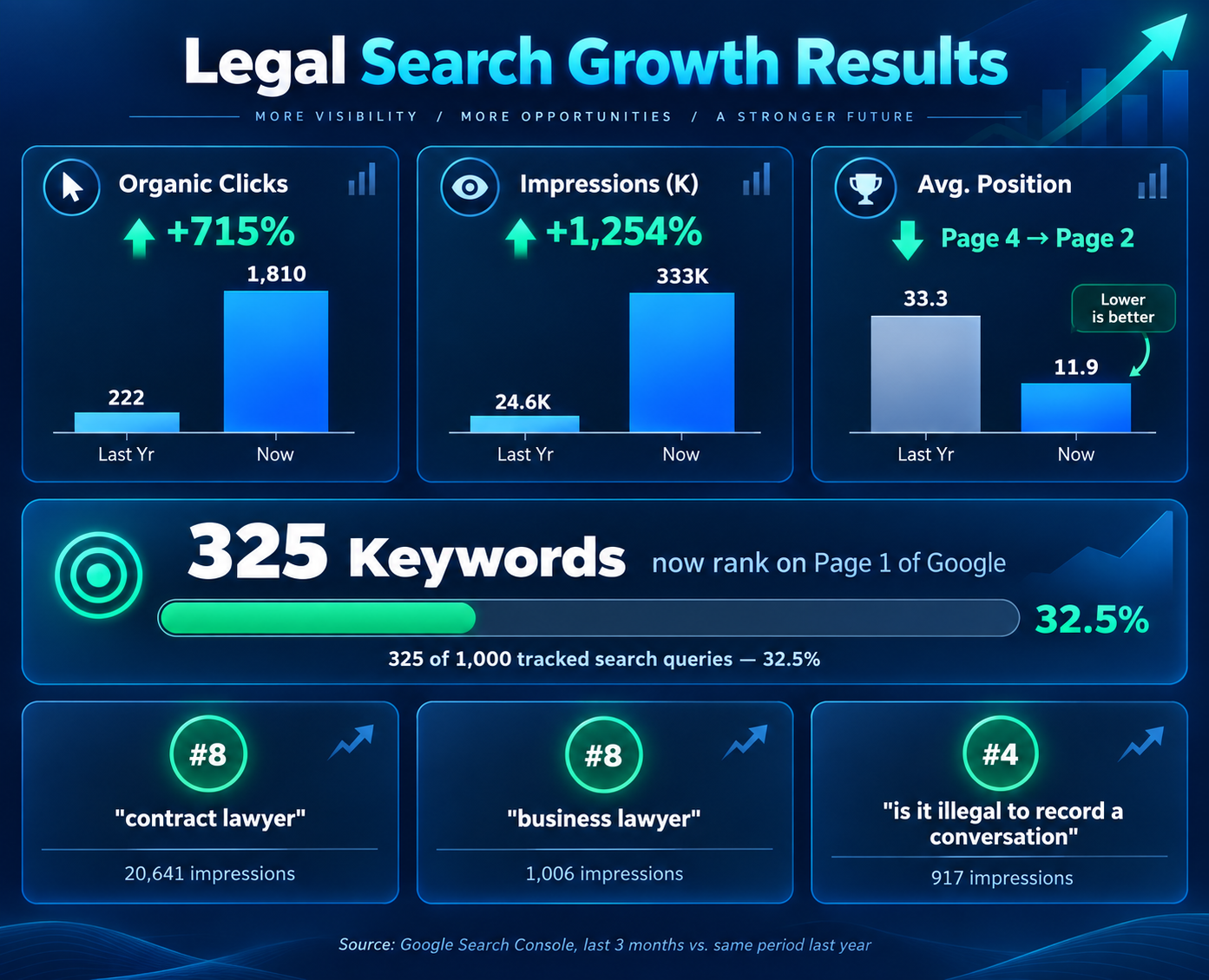
The historical comparison for one client, a South Florida firm, reported a 715% increase in organic clicks and more than 1,250% growth in impressions. The original case study reported page-one rankings for several keywords, including a generic, highly competitive term like “contract lawyer.” You can see the full breakdown, including the real Search Console data, in the Firm case study.
These are historical results for this project, not current rankings or a forecast for another business. The work included technical fixes and content improvements.
Decide What Your Website Actually Needs
A redesign can improve clarity, usability, and trust. Technical repairs can remove obstacles to crawling and indexing. The right priority depends on what the review finds: some websites need focused repairs, while others need better content, a more useful structure, or a broader rebuild.
If your website looks good but brings few search visitors, start by reviewing indexing, search queries, page content, and the competition. Explore SEO and search visibility services for ongoing search work, or WordPress website design and redesign if the site itself needs a refresh or rebuild.
For routine WordPress updates and agreed ongoing checks, explore WordPress Website Care & Maintenance.
Let’s take a look
at your website.
Tell me what you want your website to do for your business. We’ll talk through the priorities.
Talk with Alan ↗